Very well, I was not really chatting or conferencing with a toy animal. My wife’s little tiger just served as a prop, since he was far more likely to stay put than any of our actual miniature tigers, I mean cats.
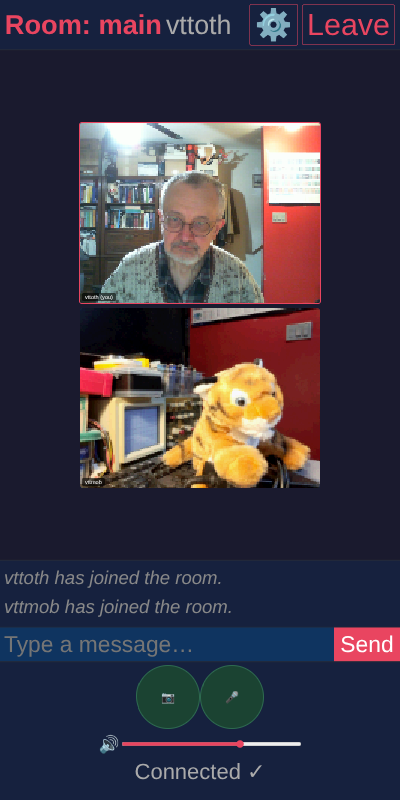
In any case, the point was not so much who I was chatting with but how: I was doing so using my very own little conferencing service, implemented in half an afternoon with prodigious coding help from Claude.
No, not “vibe coding”. I tried “vibe coding” and it’s not my cup of tea. Not because I am a control freak but because I like to know what my applications do and why, and how to fix and debug them. Moreover, I don’t mind owning the concept. That’s not the time-consuming part. The time-consuming part is implementation and this is where coding assistants, Claude in particular, excel. Don’t outsource combinatorial reasoning, like navigating the excessive landscape of design options. Nor do I need a coding agent type commands for me (and, on a bad day, wipe out my code base.) What I need the AI for is to write the routine stuff once the design is settled.
That is exactly what we did here, and the result… well, works. The concept is simple: Keep everything TCP. Of course TCP is the worst choice for real-time media streaming, except for the alternative: UDP works until it doesn’t, because it is blocked by a NAT-firewall, a mobile network policy, or something else. In fact, it was my struggle to get things run well in these post-Skype days that led me to my simple (but not simplistic) implementation: sending compressed, differenced video and audio at a bandwidth that remains manageable even with my self-hosted relay host for up to maybe half a dozen users.
The thing works. Granted, so far I only tested it with two users (me and me) but it works robustly and reliably even over a cellular connection. I might soon get a chance to test it with real users, some friends. Until then, I have my plush tiger to talk to.
All in all, 2000+ lines of good quality, working code in half an afternoon. That’s what a good AI assistant can do under competent supervision.
Again I feel somewhat amazed with the diversity of your interests and, well, swiftness of implementing these and those things! From the brief description of transmitting the video I’m not quite sure whether you and claude reused some available codec to fit the streaming capabilities of your setup, or even in this part there was at least something written “from scratch”. It would be curious to understand some figures – what throughput is achieved and how many fps of which resolution it allows. Picture looks like it could be perhaps as low as 128 pixels wide but I believe it’s fairly fine for video call in most circumstances! Perhaps mr Tiger may use radio or even tablet playing some animation to make test more “live” :) but he looks good even as is!
The default I used is 160×120 pixels, 5 fps, all customizable in config. For a video chat, that is sufficient, and the bandwidth requirement for my server — which scales quadratically — remains acceptable with up to 6 participants. As to the encoding, it’s the simplest algorithm you can imagine: the image is split into small rectangles, each rectangle is retransmitted only with minimal RLE compression if it has changed substantially (a threshold that’s part of the config) and consumed opportunistically, so if the TCP hiccups, when transmission is resumed the receiver catches up automatically without any magic timing. Audio is captured and interlaced, and if it hiccups, stale audio frames are simply dropped. Inelegant but works, and the important thing is, it works over plain TCP. As to the bandwidth, under normal circumstances (few full-screen changes, just the participants’ heads moving much of the time) with 4 tested participants the bandwidth usually stayed under a few Mbps/s, server-side, occasionally getting close to 20 Mbps. The raw, uncompressed bandwith for 4 participants with audio would be precisely 19.2 Mbps with these settings (8000 samples/s audio.) Long story short… not spectacular, but it works, and more importantly it works in quirky network configs where more sophisticated methods fail.